Before connecting smart home devices, review their privacy settings carefully. Check if the manufacturer’s privacy policy explains how your data is shared or sold, and disable any unnecessary data collection features. Change default passwords, enable two-factor authentication, and set up separate Wi-Fi networks for your devices. confirm your device’s firmware is up-to-date and encrypts stored data. Taking these steps helps protect your privacy—continue exploring to learn more about safeguarding your smart home.
Key Takeaways
- Review and adjust privacy settings in device apps to control data sharing and collection.
- Enable encryption for both data transmission and stored data to safeguard privacy.
- Change default passwords and enable two-factor authentication for device security.
- Segregate smart home devices on separate networks to reduce security risks.
- Regularly update device firmware and review privacy policies to stay protected.
Have you ever wondered how much of your life your smart home is actually watching? Every time you speak a command to your voice-activated devices or connect new gadgets, you’re sharing more than just convenience—you’re potentially exposing personal details. Before you immerse yourself in adding more devices, it’s vital to understand how to protect your privacy. One of the key aspects is voice command security. When you use voice commands, your voice data often travels over the internet to cloud servers for processing. If these transmissions aren’t secure, someone could intercept your commands, gaining access to sensitive information like your schedules, habits, or even private conversations. To prevent this, check whether your devices support robust voice command security features. Many manufacturers offer encryption protocols designed to keep your voice data private during transmission. Making sure your devices use secure, encrypted channels means that even if someone intercepts the data, they won’t be able to decipher it. Data encryption isn’t just for transmitting information; it also applies to how your device stores data. Look into whether your smart home devices encrypt stored data and how they handle updates. Regularly updating your devices helps patch security vulnerabilities and makes certain that encryption standards stay current. Additionally, review the privacy policies of your device manufacturers—some may share your data with third parties or use it for targeted advertising. Adjust privacy settings within each device’s app or control panel. Disable any features that collect audio or personal data unless you truly need them. You should also consider creating separate networks for your smart devices and your primary Wi-Fi network. This way, even if a device is compromised, it won’t give intruders access to your entire home network. When connecting new devices, always change default passwords and enable two-factor authentication if available. These simple steps greatly reduce the risk of unauthorized access. As you set up your smart home, remember that security isn’t a one-time task but an ongoing process. Regularly review your device settings, firmware updates, and privacy policies to stay ahead of potential threats. Being aware of security protocols and making certain data encryption is in place helps ensure your privacy is protected. By understanding voice command security and making certain data encryption is in place, you’re taking proactive steps to protect your personal information. Your smart home should serve your convenience, not compromise your privacy. Take the time to familiarize yourself with these settings before connecting new devices, and you’ll enjoy the benefits of your smart home without sacrificing peace of mind. After all, a secure smart home is a smarter home.

WiFi Door Alarm System, Wireless DIY Smart Home Security System, with Phone APP Alert, 8 Pieces-Kit (Alarm Siren, Door Window Sensor, Remote), Work with Alexa, for House, Apartment, by tolviviov
WIFI Network: WIFI connection, Only works on 2.4GHz WiFi network, does NOT support 5GHz WiFi networks.
As an affiliate, we earn on qualifying purchases.
As an affiliate, we earn on qualifying purchases.
Frequently Asked Questions
How Can I Detect Hidden Smart Device Microphones?
To detect hidden microphones, you can use audio detection apps or devices that pick up unusual or faint sounds. Turn off all electronic devices and listen carefully for any background noise or clicking sounds that seem out of place. Use a flashlight to visually inspect areas like smoke detectors, picture frames, or electrical outlets. Regularly check for unfamiliar gadgets or wires that might conceal hidden microphones.
Are Smart Home Devices Vulnerable to Hacking?
Yes, smart home devices are like open books if you don’t secure them properly. Hackers can exploit vulnerabilities through weak encryption protocols or outdated firmware. To keep your digital fortress strong, regularly update your device firmware and guarantee encryption protocols are robust. These steps act as your digital shield, protecting your smart devices from sneaky intruders and keeping your home’s secrets safe from prying eyes.
What Legal Rights Do I Have Over My Smart Home Data?
You have privacy rights over your smart home data, meaning you can control how it’s collected, used, and shared. Data ownership typically belongs to you unless the device’s terms specify otherwise. Check your device’s privacy settings and review the terms of service to understand your rights. You can also request access, correction, or deletion of your data, ensuring your privacy rights are protected and your data remains under your control.
How Do I Delete My Smart Device Data Permanently?
To delete your smart device data permanently, start by accessing your device’s privacy settings. Look for options labeled “Data deletion” or “Clear data” and follow the prompts to remove stored information. Some devices may also offer a factory reset option, which erases all data and settings. Be sure to double-check that the data is fully deleted by reviewing your privacy settings afterward. This helps protect your privacy effectively.
Can I Securely Share Smart Home Access With Family Members?
Yes, you can securely share smart home access with family members. Use guest access features to limit their control, ensuring they only see what’s necessary. Set up parental controls to restrict sensitive settings and monitor activity. Always create separate accounts or profiles for each family member, and change passwords regularly. This way, you maintain privacy and security while giving trusted family members convenient access to your smart devices.

Nuki Keypad 2 NFC (2026) – Unlock Your Door with Apple Home Key, NFC, Fingerprint or 6-Digit Code, Smart Home Accessory for Nuki Smart Lock, Matter-Enabled Bluetooth Keypad for Keyless Entry
Convenient access: Unlock your door with NFC, fingerprint, or a custom entry code by simply pairing the keypad…
As an affiliate, we earn on qualifying purchases.
As an affiliate, we earn on qualifying purchases.
Conclusion
Just like Pandora’s box, your smart home holds endless possibilities—and risks. By checking your privacy settings before connecting devices, you keep temptation and trouble at bay. Think of it as forging a shield, not just for today, but for the future. Stay vigilant, stay secure, and remember that even in a world of convenience, your privacy is your greatest treasure—guard it wisely, like a modern-day Achilles guarding his armor.

DBIT N300 2.4GHz WiFi Router with WISP Wireless Repeater Mode Internet Router for Smart Home – Guest Network, Internet Access Control, Speed Limit, WPA2, WLAN Schedule, WPS, IPTV, Easy Setup (T1 Pro)
𝐒𝐭𝐚𝐛𝐥𝐞 𝐍𝟑𝟎𝟎 𝐒𝐩𝐞𝐞𝐝 𝐟𝐨𝐫 𝐄𝐯𝐞𝐫𝐲𝐝𝐚𝐲 𝐒𝐭𝐫𝐞𝐚𝐦𝐢𝐧𝐠 & 𝐁𝐫𝐨𝐰𝐬𝐢𝐧𝐠: Enjoy reliable Wi-Fi for all your daily needs. The 300Mbps…
As an affiliate, we earn on qualifying purchases.
As an affiliate, we earn on qualifying purchases.
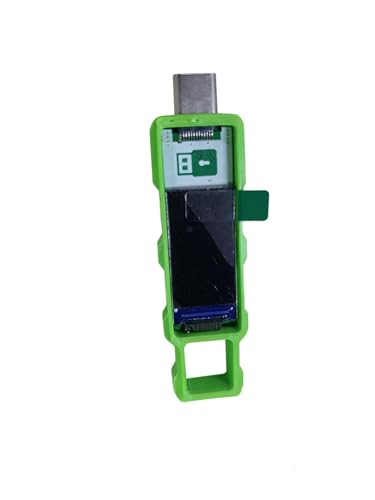
Password Keeper Offline Password Manager for Secure Storage (Green)
100% Offline & Secure Storage: This dedicated electronic device stores all your usernames, passwords, and notes locally. Your…
As an affiliate, we earn on qualifying purchases.
As an affiliate, we earn on qualifying purchases.