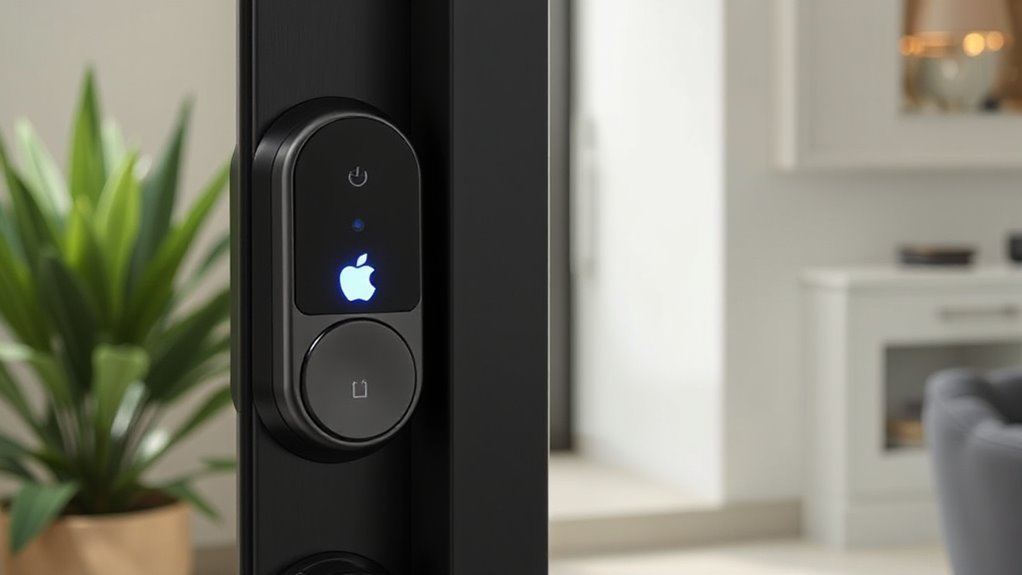
For anyone interested in integrating a smart lock with Apple HomeKey, choosing the right model can be challenging. The best picks combine seamless compatibility with reliable security features, but tradeoffs exist between price, ease of use, and advanced functions. The Level Lock Pro stands out as the most refined overall choice, offering smooth HomeKey integration and minimal design. The Yale Assure Lock 2 Plus provides excellent versatility with keypad and auto-unlock features, making it ideal for varied user needs. Still, some models may lack certain smart home integrations or require higher investment. Continue reading for a detailed comparison to find your perfect fit.
Prime for Young Adults — start your free trial
Fast free delivery, streaming and member deals for eligible 18–24 year olds.
Try it freeAs an affiliate, we earn on qualifying purchases.
Key Takeaways
- The top models excel in seamless Apple HomeKey integration, with most supporting the feature reliably across different lock types.
- Design and ease of use vary widely; minimalist locks like the Level Lock Pro prioritize appearance, while others include more features but can be bulkier.
- Pricing ranges significantly; premium options often include advanced features like auto-unlock and biometrics, but value picks can suffice for basic needs.
- Compatibility with existing smart home ecosystems varies; some locks work best with Apple HomeKit, while others add WiFi or UWB for broader integration.
- Tradeoffs often involve balancing security features, ease of installation, and smart home compatibility—consider what features matter most to your daily routine.
| ThorBolt X1 Smart Keyless Entry Fingerprint Door Lock with Keypad, Black |  | Best Overall for Versatile Access and Easy DIY Installation | Compatibility: Apple Home Key, Thread | Control App: Sleekpoint | User Capacity: 50 users, 100 passcodes, 100 fingerprints | VIEW ON AMAZON | See Our Full Breakdown |
| Level Lock Pro Smart Lock |  | Best for Seamless, Discreet Integration with Traditional Doors | Size: 62% smaller than other smart locks | Compatibility: Apple Home Key, Matter, Thread, Bluetooth | Security: Bump- and pick-resistant | VIEW ON AMAZON | See Our Full Breakdown |
| ThorBolt X3 Smart HomeKit Keyless Entry Fingerprint Door Lock, Black |  | Best for Apple Ecosystem Users Seeking Secure, DIY-Friendly Lock | Compatibility: Apple Home Key, Thread-enabled | Control: Sleekpoint app, remote control, logs | Fingerprint Storage: 100 fingerprints | VIEW ON AMAZON | See Our Full Breakdown |
| Aqara Smart Lock U50, Apple Home Key, Keyless Entry Deadbolt, Black |  | Best for Multi-Method Access and Automation Integration | Compatibility: Apple Home, Apple Home Key, Matter, Google, Alexa | Unlock Methods: Apple Home Key, keypad, remote passwords, NFC (sold separately) | Battery Life: Up to 6 months | VIEW ON AMAZON | See Our Full Breakdown |
| Aqara Smart Lock U100, Apple Home Key, Fingerprint Deadbolt, Silver | 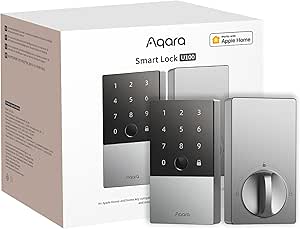 | Best for Weather-Resistant, Multi-Access Control with Long Battery Life | Compatibility: Apple Home, Apple Home Key | Unlock Methods: Fingerprint, password, mechanical key, Apple Home Key | Battery Life: Up to 8 months | VIEW ON AMAZON | See Our Full Breakdown |
| WiFi Smart Lock with HomeKey and Fingerprint |  | Best Overall for Seamless Apple HomeKey Integration and Security | Apple MFi Certified: Yes | HomeKey Technology: Yes | Battery Backup: Up to 5 hours after iPhone battery dies | VIEW ON AMAZON | See Our Full Breakdown |
| Aqara UWB Smart Lock U400, Apple Home Key, Fingerprint Deadbolt, Black |  | Best for Hands-Free Convenience and Multi-Access Options | Model Number: DL-D06E | UPC: 192784002131 | Recommended Uses: Smart home access | VIEW ON AMAZON | See Our Full Breakdown |
| ThorBolt X1 Smart HomeKit Keyless Entry Fingerprint Door Lock, Silver |  | Best for Long Battery Life and DIY Installation | Compatibility: Apple Home Key, Thread | Control App: Sleekpoint | User Capacity: 50 users, 100 passcodes, 100 fingerprints | VIEW ON AMAZON | See Our Full Breakdown |
| Aqara Smart Lock U100, Apple Home Key, Fingerprint Deadbolt, Gray |  | Best for Ecosystem Compatibility and Durability | Compatibility: Apple Home, Apple Home Key, Google Home, Alexa, IFTTT | Unlock Methods: Fingerprint, Apple Home Key, Password, Mechanical Key | Battery Life: Up to 8 months | VIEW ON AMAZON | See Our Full Breakdown |
| Yale Assure Lock 2 Plus Apple Home Keys, Black Keyless Entry Door Lock with Keypad for Code Entry and Auto-Unlock |  | Best for Classic Keyless Convenience with Apple Integration | Compatibility: Apple HomeKit, iPhone XS or later, Apple Watch Series 4 or later | Features: Home Keys, Keypad, Auto-Unlock, Auto-Lock, DoorSense | Power: Battery-powered with power reserve | VIEW ON AMAZON | See Our Full Breakdown |
| eufy Security Smart Lock C34, Keyless Entry Door Lock, Apple Home Compatible |  | Best for Seamless Multi-Access Integration | Compatibility: Apple Home, Google Home, Alexa, SmartThings | Battery Life: Up to 8 months | Power Source: 8 AA batteries | VIEW ON AMAZON | See Our Full Breakdown |
| smart lock with apple homekey | Compatibility | Battery Life |
|---|---|---|
| ThorBolt X1 Smart Keyless Entr | Apple Home Key, Thread | Up to 1 year |
| Level Lock Pro Smart Lock | Apple Home Key, Matter, Thread, Bluetooth | — |
| ThorBolt X3 Smart HomeKit Keyl | Apple Home Key, Thread-enabled | Up to 1 year |
| Aqara Smart Lock U50 | Apple Home, Apple Home Key, Matter, Google, Alexa | Up to 6 months |
| Aqara Smart Lock U100 | Apple Home, Apple Home Key | Up to 8 months |
| WiFi Smart Lock with HomeKey a | — | — |
| Aqara UWB Smart Lock U400 | — | — |
| ThorBolt X1 Smart HomeKit Keyl | Apple Home Key, Thread | Up to 1 year |
| Aqara Smart Lock U100 | Apple Home, Apple Home Key, Google Home, Alexa, IFTTT | Up to 8 months |
| Yale Assure Lock 2 Plus Apple | Apple HomeKit, iPhone XS or later, Apple Watch Series 4 or later | — |
| eufy Security Smart Lock C34 | Apple Home, Google Home, Alexa, SmartThings | Up to 8 months |
More Details on Our Top Picks
ThorBolt X1 Smart Keyless Entry Fingerprint Door Lock with Keypad, Black
The ThorBolt X1 stands out for its flexible unlocking options, supporting fingerprint, keypad, Siri, app, and traditional keys—making it a comprehensive choice for households with varied access needs. Compared to the Level Lock Pro, it offers more direct control via its app and multiple entry methods, but it requires initial setup and smartphone compatibility for full functionality. Its long battery life of up to one year and easy DIY installation make it suitable for homeowners seeking convenience without professional help. The need for app setup and occasional battery changes are tradeoffs for its feature-rich design.
This pick makes the most sense for users who want a highly adaptable lock that works well with Apple Home Key and prefers managing access directly through an app.
Pros:- Supports multiple unlocking methods including fingerprint, keypad, Siri, and traditional keys
- Easy DIY installation with adjustable latch and standard door compatibility
- Battery lasts up to one year on 8 AA batteries
- App control enables remote access management and activity monitoring
Cons:- Requires app setup and smartphone compatibility for full features
- Battery replacement needed approximately once a year
- Initial configuration can be complex for some users
Best for: Homeowners who want a flexible, easy-to-install smart lock with multiple unlocking methods and long battery life
Not ideal for: Users seeking a minimal, unobtrusive lock or those uncomfortable with app setup and maintenance
- Compatibility:Apple Home Key, Thread
- Control App:Sleekpoint
- User Capacity:50 users, 100 passcodes, 100 fingerprints
- Battery Life:Up to 1 year
- Battery Type:8 AA alkaline batteries
- Door Thickness:1-3/8″ to 1-3/4″
Our verdict“This is a versatile, feature-rich option ideal for tech-savvy homeowners who want flexible access options and long battery life.”
Level Lock Pro Smart Lock
The Level Lock Pro excels at maintaining the appearance of a traditional door, thanks to its fully hidden, ultra-compact design. Unlike the ThorBolt X1, which displays a visible keypad or fingerprint scanner, the Level Lock Pro is virtually invisible, making it perfect for homeowners who prioritize aesthetics. Its support for Apple Home Key, Matter, and Thread ensures broad compatibility, but it requires a separate hub or bridge for remote access, adding complexity and cost. Its high security standards, including bump-and pick resistance, make it ideal for users who want both discretion and safety.
Compared with other hidden locks, its reliance on additional hubs for remote management is a tradeoff, but it offers unparalleled discretion for those who want a minimal look.
Pros:- Invisible, compact design preserves door aesthetics
- Supports Apple Home Key, Matter, Thread, and Bluetooth for broad compatibility
- High security with bump-and pick-resistant cylinder
- Includes NFC key fobs and physical keys for backup
Cons:- Remote access requires a separate hub or bridge (sold separately)
- Additional keypad sold separately, increasing total cost
- Some features depend on compatible Matter hub or Thread router
Best for: Design-conscious homeowners who want a discreet lock that seamlessly integrates into existing smart home ecosystems
Not ideal for: Users who prefer an all-in-one solution without extra hubs or who need remote access out of the box
- Size:62% smaller than other smart locks
- Compatibility:Apple Home Key, Matter, Thread, Bluetooth
- Security:Bump- and pick-resistant
- Power:CR2 battery
- Door Thickness:1.75-2 inches
- Included:NFC fobs, physical keys
Our verdict“Ideal for homeowners seeking a discreet, high-security lock that integrates with Apple Home without sacrificing aesthetics, provided they can manage extra hub requirements.”
ThorBolt X3 Smart HomeKit Keyless Entry Fingerprint Door Lock, Black
The ThorBolt X3 offers a seamless Apple ecosystem experience through Home Key and Thread, akin to the Aqara U100, but with added control via the Sleekpoint app and activity logs. Its fast fingerprint recognition and adaptive learning technology make it a strong choice for quick access, while the long-lasting batteries support up to a year of use. However, remote access depends on a Thread-enabled Apple hub, similar to the Aqara U50, which can complicate setup and increase costs. Its straightforward DIY installation and compatibility with Apple devices make it suitable for users who want a reliable, Apple-centric lock.
The need for a Thread-enabled hub for remote features is a key tradeoff, but its secure biometric access makes it a standout for Apple users.
Pros:- Seamless Apple Home Key and Thread integration
- Fast, secure fingerprint recognition with adaptive learning
- Long battery life up to one year
- Easy DIY installation
Cons:- Requires Thread-enabled Apple home hub for remote access
- Limited to doors fitting specific thickness and backset dimensions
- Battery replacement needed approximately once a year
Best for: Apple ecosystem enthusiasts who prioritize biometric security and DIY installation
Not ideal for: Users without a Thread-enabled hub or those who need immediate remote access without extra equipment
- Compatibility:Apple Home Key, Thread-enabled
- Control:Sleekpoint app, remote control, logs
- Fingerprint Storage:100 fingerprints
- Battery Life:Up to 1 year
- Power:8 AA batteries
- Door Thickness:1-3/8″ to 1-3/4″
Our verdict“Best suited for Apple users seeking a biometric, easy-to-install lock with long battery life and secure integration, provided they have the necessary hub.”
Aqara Smart Lock U50, Apple Home Key, Keyless Entry Deadbolt, Black
The Aqara U50 offers a robust array of unlocking options, including Apple Home Key, keypad, remote passwords, and NFC (sold separately), making it more versatile than the ThorBolt X1. Its strong auto-lock and do-not-disturb modes add convenience and security, especially for busy households. While it requires an Aqara Zigbee hub for remote password management—similar to other Aqara models—its durable zinc alloy build and IPX5 rating ensure weather resistance. Compared to the Level Lock Pro, it provides more communication options but involves additional hub costs and setup complexity. Its battery life up to six months means regular replacements are needed with frequent use.
This makes sense for users who want multiple access methods and customizable automation, but NFC cards are sold separately, adding to the total expense.
Pros:- Supports Apple Home Key, keypad, remote passwords, and NFC
- Auto-lock and do-not-disturb modes enhance security
- Durable zinc alloy construction with IPX5 rating
- Allows automation with third-party devices via IFTTT
Cons:- NFC card sold separately, increasing costs
- Requires Aqara Zigbee hub for remote password features
- Battery life may require frequent replacement with heavy use
Best for: Smart home users who want flexible unlocking options and automation support in a weather-resistant lock
Not ideal for: Homeowners seeking a simple, straightforward lock with minimal setup or those without a Zigbee hub
- Compatibility:Apple Home, Apple Home Key, Matter, Google, Alexa
- Unlock Methods:Apple Home Key, keypad, remote passwords, NFC (sold separately)
- Battery Life:Up to 6 months
- Material:Zinc alloy
- IP Rating:IPX5
- Temperature Range:-31°F to 150.8°F
Our verdict“Ideal for users who want multi-method access and automation features with weather resistance, provided they can handle extra hub setup and additional costs.”
Aqara Smart Lock U100, Apple Home Key, Fingerprint Deadbolt, Silver
The Aqara U100 combines durability with multiple unlocking options, supporting Apple Home Key, fingerprint, password, and mechanical key. Unlike the ThorBolt X3, which emphasizes biometric access, the U100’s long battery life of up to 8 months and IP65 weather resistance make it suitable for outdoor use. Its support for Zigbee 3.0 hub for remote management aligns it with other Aqara models, but this adds setup complexity and extra costs. While it lacks NFC cards included in some competitors, it offers AES encryption for security. This lock is best for users who need a weatherproof, long-lasting lock with multiple access methods, but it’s less ideal for those seeking a simple, hub-free solution.
Its combination of features and durability makes it well-suited for outdoor or high-traffic areas within the smart home ecosystem.
Pros:- Supports Apple Home Key, fingerprint, password, and mechanical key
- Long battery life of up to 8 months
- Weather-resistant IP65 rating suitable for outdoor use
- AES encryption ensures secure access
Cons:- Requires Zigbee 3.0 hub for remote password management
- NFC card not included, sold separately
- Setup involves additional hub and configuration
Best for: Residents needing a weather-resistant, multi-access lock with long battery life and Apple Home Key support
Not ideal for: Homeowners who want a plug-and-play solution without the need for a Zigbee hub or who prefer NFC cards included in the package
- Compatibility:Apple Home, Apple Home Key
- Unlock Methods:Fingerprint, password, mechanical key, Apple Home Key
- Battery Life:Up to 8 months
- Material:Zinc alloy
- IP Rating:IP65
- Temperature Range:-31°F to 151°F
Our verdict“Best suited for outdoor or high-traffic areas needing robust, multi-method access with long battery life, provided users are prepared for hub setup.”
WiFi Smart Lock with HomeKey and Fingerprint
This lock stands out for supporting Apple HomeKey directly, making it a reliable choice for users who want a smooth digital key experience with their iPhone or Apple Watch. Compared with the Yale Assure Lock 2 Plus, it offers local fingerprint storage, enhancing privacy by avoiding cloud reliance. Its weatherproof build and straightforward installation make it suitable for a wide range of homes, but it requires compatible Apple devices, limiting universal compatibility. The absence of broader smart home ecosystem integration means it’s best for Apple-centric households that prioritize security and ease of use over extensive automation options.
Pros:- Supports Apple HomeKey for convenient unlocking via iPhone or Apple Watch
- Local fingerprint data storage enhances privacy and security
- Weather-resistant IP65 rating suitable for all seasons
- Easy to install without drilling or wiring
Cons:- Requires compatible Apple devices for HomeKey functionality
- Limited to standard deadbolt sizes, restricting customization
Best for: Apple users seeking a straightforward, secure, and weather-resistant lock with HomeKey support.
Not ideal for: Homeowners who want a device compatible with multiple smart home ecosystems or require broader automation options.
- Apple MFi Certified:Yes
- HomeKey Technology:Yes
- Battery Backup:Up to 5 hours after iPhone battery dies
- Security:Local fingerprint data storage, anti-peep password
- Material:Premium metal finish
- Waterproof Rating:IP65
- Temperature Range:-4F to 140F
- Installation Compatibility:Door thickness 1-3/8 to 2-1/8 inches, bore hole 1-1/2 or 2-1/8 inches, backset 2-3/8 or 2-3/4 inches
- Warranty:18 months
Our verdict“This pick makes the most sense for Apple users who want a reliable, weatherproof lock with seamless HomeKey support.”
Aqara UWB Smart Lock U400, Apple Home Key, Fingerprint Deadbolt, Black
The Aqara UWB U400 excels in offering hands-free unlocking through ultra-wideband technology, making it a standout for those who value effortless entry. Unlike the WiFi Smart Lock, it supports multiple access methods, including Apple Home Key, fingerprint, passcode, voice, app, NFC, and physical key—ideal for multi-user households. Its support for Matter over Thread broadens its compatibility across various smart home systems, but it demands a Zigbee hub for remote management and frequent recharging may be necessary depending on usage. This lock is perfect for users who want versatility and automation integration, but those without compatible hubs might find its features limited.
Pros:- Hands-free unlocking with UWB technology for convenience and security
- Multiple access options including Apple Home Key, fingerprint, passcode, and physical key
- Supports Matter over Thread for broad ecosystem compatibility
- IP65 outdoor rating and rekeyable design for durability
Cons:- Requires compatible Apple devices and a Zigbee hub for full functionality
- NFC cards are sold separately, adding to overall cost
- Battery life may need frequent recharging depending on use
Best for: Tech-savvy homeowners seeking a versatile, multi-access smart lock with ultra-wideband hands-free unlocking.
Not ideal for: Users without compatible hubs or those preferring simple, Wi-Fi-only solutions without additional setup.
- Model Number:DL-D06E
- UPC:192784002131
- Recommended Uses:Smart home access
- Included Components:outer panel, inner panel, deadbolt, installation diagram, user manual, strike plate kit, mounting plate, adapter ring, mechanical key, mounting plate screwkit
- Brand Name:Aqara
- Best Sellers Rank:#6,232 in Tools & Home Improvement, #33 in Deadbolts
- Customer Reviews:4.0/5
Our verdict“Ideal for those who want multi-access, hands-free convenience, and compatibility across smart home ecosystems, provided they can manage the setup requirements.”
ThorBolt X1 Smart HomeKit Keyless Entry Fingerprint Door Lock, Silver
The ThorBolt X1 supports Apple Home Key and Thread, focusing on straightforward, secure keyless entry with a long-lasting battery life—up to a year on 8 AA batteries. Compared with the Yale Assure Lock 2 Plus, it offers local fingerprint recognition with encrypted storage, but it requires a Thread-enabled Apple hub for remote control, which may complicate setup for some users. Its DIY-friendly installation suits homeowners who prefer easy setup on standard doors, but its reliance on Thread and Bluetooth limits its remote management options compared to Wi-Fi-based locks. It’s best for users prioritizing long battery life and simple installation over multi-protocol connectivity.
Pros:- Supports Apple Home Key and Thread for seamless smart home integration
- Long battery life of up to one year on 8 AA batteries
- Fast, secure fingerprint recognition with local encrypted storage
- Simple DIY installation suitable for standard doors
Cons:- Requires a Thread-enabled Apple home hub for remote access
- Limited to standard door sizes and backset measurements
Best for: Homeowners seeking a durable, easy-to-install lock with excellent battery life and Apple HomeKit support.
Not ideal for: Users looking for a lock with Wi-Fi remote access or needing extensive smart home ecosystem integration without a Thread hub.
- Compatibility:Apple Home Key, Thread
- Control App:Sleekpoint
- User Capacity:50 users, 100 passcodes, 100 fingerprints
- Battery Life:Up to 1 year
- Battery Type:8 AA alkaline batteries
- Door Thickness:1-3/8″ to 1-3/4″
- Backset:2-3/8″ to 2-3/4″
- Door Hole Size:2-1/8″ or 1-1/2″
Our verdict“This lock is perfect for those who want a long-lasting, easy-to-install Apple-compatible lock with reliable local biometric security.”
Aqara Smart Lock U100, Apple Home Key, Fingerprint Deadbolt, Gray
The Aqara U100 stands out for supporting Apple Home Key alongside multiple voice assistants and smart home platforms like Google Home, Alexa, and IFTTT. It offers a versatile access suite, including fingerprint, passcode, mechanical key, and Apple Home Key, making it a flexible choice for varied households. Its zinc alloy body and IP65 rating ensure weather resistance and durability, surpassing the WiFi Smart Lock’s weatherproofing. However, it depends on the Aqara Zigbee 3.0 hub for remote management and automation, which can add complexity and cost. This lock suits users who want broad ecosystem support and long battery life but are comfortable with some additional setup requirements.
Pros:- Supports Apple Home Key for easy unlocking with iPhone or Apple Watch
- Compatible with multiple voice assistants and platforms
- Zinc alloy and IP65-rated for durability and weather resistance
- Battery life up to 8 months with USB-C emergency charging
Cons:- Requires Aqara Zigbee 3.0 hub for remote control and automation
- NFC cards sold separately, increasing total cost
- Some features depend on additional smart home devices
Best for: Smart home enthusiasts needing a weatherproof, multi-protocol lock compatible with Apple Home and other ecosystems.
Not ideal for: Users seeking a simple, Wi-Fi-only solution without additional hubs or who do not want to manage Zigbee devices.
- Compatibility:Apple Home, Apple Home Key, Google Home, Alexa, IFTTT
- Unlock Methods:Fingerprint, Apple Home Key, Password, Mechanical Key
- Battery Life:Up to 8 months
- Power:4 AA batteries + USB-C
- Material:Zinc alloy
- IP Rating:IP65
- Temperature Range:-31°F to 151°F
Our verdict“Best suited for households that want a durable, multi-platform compatible lock with Apple Home Key and extensive automation support, despite setup complexity.”
Yale Assure Lock 2 Plus Apple Home Keys, Black Keyless Entry Door Lock with Keypad for Code Entry and Auto-Unlock
The Yale Assure Lock 2 Plus offers a familiar keypad alongside Apple Home Keys, combining traditional and digital access methods. It excels in ease of use, especially with Auto-Unlock and a power reserve, making it suitable for those who prefer a mix of manual and digital control. Compared with the ThorBolt X1, it relies solely on Bluetooth and requires an Apple Home Hub for remote access, which limits its flexibility outside the Apple ecosystem. Its lack of Wi-Fi means it’s less suitable for households wanting remote management without additional devices. This lock makes sense for Apple-centric users prioritizing seamless automation and manual backup options.
Pros:- Supports Apple Home Keys for fast access with iPhone or Apple Watch
- Keypad and auto-unlock enhance convenience
- Seamless integration with Apple HomeKit for automation and voice control
- Power reserve feature offers access after battery depletion
Cons:- Requires Apple Home Hub (Apple TV, HomePod) for remote access and sharing
- Limited to Bluetooth, with no Wi-Fi connectivity
- Compatibility limited to iOS 15+ and watchOS 8+
Best for: Apple users who want a keypad-enabled lock with convenient Home Key access and auto-unlock features.
Not ideal for: People looking for Wi-Fi-enabled locks with remote control capabilities without relying on an Apple Hub.
- Compatibility:Apple HomeKit, iPhone XS or later, Apple Watch Series 4 or later
- Features:Home Keys, Keypad, Auto-Unlock, Auto-Lock, DoorSense
- Power:Battery-powered with power reserve
- Connectivity:Bluetooth
Our verdict“Ideal for Apple users seeking a keypad lock with Home Key support and reliable automation, but without Wi-Fi remote capabilities.”
eufy Security Smart Lock C34, Keyless Entry Door Lock, Apple Home Compatible
The eufy Security Smart Lock C34 stands out for its smooth integration with Apple Home and compatibility with other major ecosystems like Google Home and Alexa. Unlike the Yale Assure Lock 2 Plus, which offers keypad and auto-unlock features, the C34 emphasizes multiple access options—including app, keypad, physical key, and voice commands—making it versatile for various users. Its straightforward installation process requires only about 15 minutes, appealing to those seeking a quick setup. However, its battery life, while up to 8 months, can vary with usage, and frequent users may need to replace batteries sooner. Also, it’s designed primarily for US and Canadian standard doors, limiting its suitability for international buyers. Compared to the Aqara U100, which offers similar Apple Home Key support, the C34 provides broader ecosystem compatibility but relies on compatible smart home hubs for remote access. This pick makes the most sense for homeowners who want a flexible, easy-to-install lock that integrates seamlessly with their existing smart home setup.
Pros:- Seamless integration with Apple Home and other ecosystems
- Multiple access options including app, keypad, physical key, and voice commands
- Easy 15-minute installation process
Cons:- Battery life depends heavily on usage and may require frequent replacements
- Limited to US and Canadian standard doors, reducing international suitability
- Requires compatible smart home hubs for remote control
Best for: Homeowners seeking a versatile, easy-to-install smart lock with broad ecosystem compatibility and multiple access methods.
Not ideal for: International buyers with non-standard door sizes or those who prefer built-in auto-unlock without needing additional hubs.
- Compatibility:Apple Home, Google Home, Alexa, SmartThings
- Battery Life:Up to 8 months
- Power Source:8 AA batteries
- Installation:Easy 15-minute setup
- Coverage:18 months electronic, 36 months mechanical
Our verdict“This lock is best for users who want flexible access options and broad smart home compatibility with straightforward installation.”

How We Picked
Our evaluation focused on compatibility with Apple HomeKey, overall build quality, ease of installation, and smart home integration features. We prioritized products that reliably support HomeKey without sacrificing security or user convenience. Additional factors included connectivity options (like WiFi, Bluetooth, UWB), user access methods, and design aesthetics. We ranked locks based on a combination of performance, value for money, and versatility, ensuring options suit different budgets and user needs. This approach helps identify the most well-rounded and dependable choices for those seeking Apple HomeKey-compatible smart locks.| smart lock with apple homekey | Battery Life |
|---|---|
| ThorBolt X1 Smart Keyless Entr | Up to 1 year |
| Level Lock Pro Smart Lock | — |
| ThorBolt X3 Smart HomeKit Keyl | Up to 1 year |
| Aqara Smart Lock U50 | Up to 6 months |
| Aqara Smart Lock U100 | Up to 8 months |
| WiFi Smart Lock with HomeKey a | — |
| Aqara UWB Smart Lock U400 | — |
| ThorBolt X1 Smart HomeKit Keyl | Up to 1 year |
| Aqara Smart Lock U100 | Up to 8 months |
| Yale Assure Lock 2 Plus Apple | — |
| eufy Security Smart Lock C34 | Up to 8 months |
Factors to Consider When Choosing Smart Lock With Apple Homekey
When selecting a smart lock with Apple HomeKey, understanding key factors can prevent common pitfalls and help you pick the ideal device for your home. Compatibility, installation, and security are critical, but other considerations like smart home ecosystem integration and user access flexibility also matter. Here’s what to keep in mind to make an informed choice:Compatibility and Ecosystem Integration
Ensure the lock supports Apple HomeKey and integrates seamlessly with your existing Apple devices and Home app. Some locks also work with other ecosystems, but if your priority is Apple-centric features, verify full compatibility. Compatibility issues can lead to frustration, especially if you plan to use automation or remote access features regularly.Ease of Installation and Setup
Choose a model that matches your technical comfort level—some locks are straightforward to install with minimal tools, while others may require more effort or professional help. Clear instructions and reliable app support are also important to avoid setup headaches, especially if you want to start using HomeKey features quickly.Security Features and Certifications
Look for locks with strong encryption, tamper alerts, and certifications such as ANSI/BHMA standards. Even with advanced features like biometrics or auto-unlock, security must remain a priority. Be wary of models that cut corners on hardware quality or rely on weak encryption, as they could compromise your home’s safety.Connectivity Options and Smart Home Features
Consider whether the lock uses Bluetooth, WiFi, or UWB, and how that impacts range, reliability, and compatibility. Additional features like keypad entry, fingerprint scanners, or auto-unlock can add convenience but may come with increased cost or complexity. Choose a lock that aligns with your existing smart home setup for seamless control.Price and Long-Term Value
Premium models often include more features and better integration, but may be overkill for casual users. Conversely, budget options might lack key functionalities or have less durable hardware. Balance your budget with the features you truly need, and consider the long-term reliability and maintenance costs of your chosen lock.Frequently Asked Questions
Will all Apple devices support HomeKey-enabled smart locks?
Most recent iPhones and Apple Watches support the HomeKey feature, but compatibility can depend on the specific lock model and software version. Typically, devices with iOS 15 or later and the latest WatchOS are required. To ensure full functionality, verify that your device’s firmware is up to date and that the lock explicitly supports HomeKey, as some older models may lack this feature or have limited support.
Can I use a smart lock with Apple HomeKey if I don’t have a HomeKit hub like Apple TV or HomePod?
While some locks can operate locally via Bluetooth or UWB without a hub, having a HomeKit hub such as an Apple TV or HomePod enhances remote access, automation, and voice control. Without a hub, your control options may be limited to nearby Bluetooth or UWB signals, reducing convenience. For full HomeKey functionality and remote management, a compatible hub is highly recommended.
Are smart locks with Apple HomeKey secure enough for high-security homes?
Many HomeKey-compatible locks feature robust encryption, biometric options, and tamper alerts, making them suitable for most residential security needs. However, no lock is entirely foolproof. High-security homes might want to combine a smart lock with a traditional deadbolt or additional security measures. Always check for certifications and security features, and avoid models with known vulnerabilities or weak hardware.
What’s the typical battery life of these smart locks, and how easy is it to replace batteries?
Battery life varies depending on features and usage patterns, but most locks last between 6 months to a year on a set of batteries. Many models offer low-battery alerts via the app or notifications, prompting timely replacement. Battery replacement is generally straightforward, with most locks designed for quick access to battery compartments, but always check the manufacturer’s instructions to avoid mishandling your lock.
Is it worth paying more for a smart lock with advanced features like UWB or biometric access?
If you prioritize convenience and enhanced security, investing in a lock with features like UWB or biometrics can be worthwhile. These options often offer faster, more reliable access, and additional layers of security that basic models lack. However, for standard home use, simpler locks with HomeKey support can provide ample security at a lower cost. Consider your daily routines and security needs before opting for the most feature-rich model.
Conclusion
The best overall pick for most users is the Level Lock Pro, thanks to its sleek design, reliable HomeKey support, and easy integration. For those seeking the best value, the ThorBolt X1 offers solid features at a more accessible price point. If premium features like UWB or biometric access are priorities, the Aqara UWB Smart Lock U400 or Yale Assure Lock 2 Plus stand out, though at a higher cost. Beginners or less tech-savvy users should favor models with straightforward installation and setup, while security-conscious buyers should focus on locks with robust certifications. Tailor your choice based on your budget, technical comfort, and specific security needs to find the perfect smart lock with Apple HomeKey for 2026.
Evergreen bestsellers Picks
bestsellers
As an affiliate, we earn on qualifying purchases.