TL;DR

Get health and wellness essentials delivered free with Prime
- Fast, free delivery on millions of items
- Prime Video, Amazon Music and more included
- Member-only deals all year
A smart outdoor camera with a spotlight combines security monitoring with active deterrence. When shopping, prioritize power source and storage options over raw resolution, as battery life and subscription costs significantly impact long-term usability. Always check local privacy laws before installation.
You hear a noise outside. Is it the wind, a raccoon, or someone testing your back gate? A smart outdoor camera with spotlight answers that question instantly. It doesn’t just watch; it illuminates. The sudden burst of light often scares off intruders before they even touch your property, while simultaneously capturing clear, color video of the event.
But the market is crowded. You might have looked at the Ring Spotlight Cam 2K Battery, only to find it discontinued or unavailable. That’s frustrating. You need a device that works today, not one that’s gathering dust in a warehouse. This guide cuts through the marketing noise to help you choose a camera that fits your home, your power situation, and your privacy comfort level.
We’ll break down what actually matters—like night vision quality versus raw resolution—and compare current alternatives. You’ll learn how to avoid false alarms that wake you up at 3 AM and how to install the device so it respects your neighbors. Let’s find the right fit for your security needs.
Prioritize power source (battery vs. wired) based on your willingness to perform maintenance and your home’s electrical setup.
Resolution is important, but lens quality, night vision processing, and field of view often impact usable footage more than pixel count.
Smart detection features like person and vehicle alerts are essential for reducing false alarms and preserving battery life.
Check subscription costs for cloud storage; local storage options can save money but require more management.
Install the camera at a height that prevents tampering but still captures identifiable facial details, avoiding glare and privacy violations.
Why Resolution Isn’t the Only Thing That Matters
When you shop for a smart outdoor camera with spotlight, the spec sheet often leads with resolution. You’ll see terms like 1080p, 2K, and 4K. It’s tempting to assume higher numbers equal better security. But resolution is just one piece of the puzzle. A 4K camera with a poor lens or bad low-light processing will produce grainy, unusable footage compared to a well-tuned 1080p camera. The implication is clear: marketing specs often obscure real-world performance. You are paying for pixels, not necessarily for clarity.
Consider the field of view. A wider angle covers more ground, which is great for monitoring a large driveway. However, it stretches the image, making distant faces smaller and harder to identify. A narrower field of view might miss the edge of your yard but provides sharper detail on the front door. You need to balance coverage with clarity. The tradeoff here is strategic: do you want to see everything vaguely, or the critical entry points clearly? For most homeowners, clarity at the door outweighs peripheral coverage.
Video compression also plays a huge role. To save bandwidth, cameras compress video files. Aggressive compression can introduce digital artifacts, making a 2K image look blocky and indistinct. Look for cameras that use efficient codecs like H.264 or H.265, which maintain quality at lower bitrates. This ensures that when you zoom in on a license plate or a face, the pixels actually resolve into readable details. Without efficient compression, high-resolution footage becomes a liability, consuming storage and bandwidth without providing actionable intelligence.
For example, imagine a delivery driver leaves a package on your porch at night. A high-resolution camera with poor night processing might show a blurry shape. A lower-resolution camera with excellent color night vision and a bright spotlight will clearly show the driver’s uniform and the package label. That context is what matters when filing a police report or disputing a delivery claim. Ultimately, evidence quality is defined by legibility and context, not just pixel count.
Products Worth Considering

Garmin Forerunner 55 GPS Running Smartwatch, Black

Fitbit Charge 6 Fitness Tracker – Porcelain/Silver

Levoit Vital 100S-P Air Purifier with Washable Pre-Filter
As an affiliate, we earn on qualifying purchases.
Power Source: Battery vs. Wired Trade-offs
How you power your camera dictates how you use it. This is often the most overlooked decision in buying a smart outdoor camera with spotlight. Battery models offer flexibility; you can mount them anywhere with Wi-Fi. But they come with a hidden cost: maintenance. Using the spotlight frequently drains the battery rapidly. If you live in a windy area where trees trigger motion alerts, you might be climbing a ladder to recharge the unit every few weeks. The implication is that convenience often trades off with reliability. A camera that is dead is a camera that is blind.
Wired cameras, like the Ring Floodlight Cam Wired Plus, eliminate battery anxiety. They draw constant power from your home’s electrical system. This allows for features that battery models can’t support, such as continuous recording or higher-brightness floodlights. However, installation is harder. You’ll likely need an existing outdoor junction box or an electrician to run new wiring. This adds to the upfront cost and complexity. The tradeoff here is immediate financial and labor investment for long-term operational simplicity and feature richness.
Hybrid options exist, too. Some battery cameras offer optional solar panels. While this sounds ideal, it’s not a magic bullet. Solar charging depends on sunlight exposure, weather conditions, and camera activity. A camera facing north in a shaded yard will rarely charge, even with a panel. Treat solar accessories as a supplement to extend battery life, not a permanent replacement for charging. Relying on solar in suboptimal locations can lead to false confidence in system uptime.
Consider your tolerance for maintenance. If you hate climbing ladders, wired is better. If you rent or can’t modify your home’s wiring, battery is your only real option. Just be prepared to adjust sensitivity settings to preserve power. A quick-release battery pack, found in some models, makes swapping easier, but it’s still a chore. The key takeaway is to align the power source with your lifestyle and home infrastructure to avoid becoming your own maintenance crew.
Spotlight Performance and Night Vision Modes
The spotlight is the active defense feature of your camera. It’s not just a flashlight; it’s a deterrent. When motion is detected, the light snaps on, often startling intruders. But how effective is it? Brightness matters, but so does coverage. A narrow spotlight might blind a face but leave the rest of the yard dark. A floodlight spreads light widely, reducing shadows where someone could hide. The implication is that light distribution is as critical as intensity; a bright beam that misses the subject is useless.
Most modern cameras use a dual-mode night vision system. When the spotlight is off, they rely on infrared (IR) LEDs. This produces black-and-white footage. It’s discreet and doesn’t disturb neighbors, but it lacks color context. When the spotlight triggers, many cameras switch to color mode. This is crucial for identifying clothing colors, vehicle colors, or skin tones. The tradeoff here is between stealth and evidentiary value. IR preserves privacy and power but sacrifices the color data often required by law enforcement.
Some advanced models, like the Ring Floodlight Cam 4K Pro, offer superior low-light processing. They can produce color images even in very low light without turning on the spotlight. This is a significant advantage if you want to monitor your property without constantly lighting up the neighborhood. Check if the camera allows you to customize these modes. You might want the light on for deterrence at night but off during the day to avoid glare. This flexibility allows you to tailor the system’s visibility profile to your specific security goals versus community relations.
Also, consider the siren. Many spotlight cameras include a remote-activated siren. While not a substitute for a professional alarm system, a loud siren combined with a bright light is a powerful psychological deterrent. It signals that the property is monitored and active. Verify the decibel rating; 105 dB is loud enough to be heard clearly throughout a house and yard. However, be aware that sirens can also cause noise complaints if triggered by false alarms, so reliable detection is paramount.
Smart Detection: Reducing False Alarms
Nothing kills the utility of a security camera faster than constant false alerts. If your phone buzzes every time a leaf blows across the porch, you’ll start ignoring it. That’s when you miss the real threat. Smart detection features aim to solve this by using AI to distinguish between relevant events and background noise. The implication is that alert fatigue is a security vulnerability; a system that cries wolf is effectively disabled.
Look for cameras that offer person, vehicle, and animal detection. These algorithms analyze the shape and movement of objects. A passing car triggers a vehicle alert, while a raccoon triggers an animal alert. You can then choose which notifications you want to receive. This filtering is essential for battery life, too, as it prevents unnecessary recording and cloud uploads. The tradeoff here is processing power versus battery consumption; sophisticated AI requires energy, but it saves energy by reducing data transmission.
However, accuracy varies. No system is perfect. Rain, snow, and shadows can still trigger false positives. Adjustable sensitivity settings are your best friend here. You can set the camera to ignore motion in certain zones, like a busy street or a swaying tree. Customizable motion zones allow you to focus the camera’s attention on critical areas, like your front door or garage entry. This requires initial setup effort but pays dividends in long-term usability and peace of mind.
On-device processing is becoming more common. Instead of sending every frame to the cloud for analysis, the camera processes data locally. This can speed up alerts and reduce bandwidth usage. It also enhances privacy, as raw video doesn’t leave your device unless an event is triggered. Check if the camera supports local storage or processing to minimize reliance on cloud subscriptions for basic detection. This shift toward edge computing reduces your monthly costs and keeps sensitive footage on your own hardware, addressing both financial and privacy concerns.
Storage Options: Cloud vs. Local
Where does your video go? This is a critical decision with long-term cost and privacy implications. Most smart outdoor cameras default to cloud storage. This means video clips are uploaded to the manufacturer’s servers. It’s convenient—you can access footage from anywhere, and the data is safe if the camera is stolen. But it usually requires a monthly subscription. The implication is a recurring operational expense that can dwarf the initial hardware cost over several years.
Without a subscription, many cameras limit you to live viewing and real-time alerts. You might lose the ability to review past events. Some models offer basic cloud storage for a short period, like 24 hours, without a fee. Check the fine print. If you want to keep a year of footage, cloud subscriptions can add up significantly over time. The tradeoff is convenience versus cost; you are paying for peace of mind and accessibility.
Local storage is an alternative. Some cameras support microSD cards, while others connect to a local hub. This allows you to record continuously or save events without monthly fees. It’s also more private, as your data stays in your home. However, local storage has risks. If someone steals the camera, they steal the footage. If the hub fails, you might lose data. Plus, you need to manage the storage space, deleting old files or replacing cards. This shifts the burden from financial to managerial.
Hybrid systems offer the best of both worlds. You can use local storage for continuous recording and cloud storage for critical events. This balances cost and convenience. Evaluate your needs: do you need 24/7 surveillance, or just event clips? If you’re comfortable managing hardware, local storage saves money. If you want set-it-and-forget-it simplicity, cloud is easier, but budget for the ongoing cost. The ideal choice depends on your risk tolerance for data loss versus your tolerance for subscription fees.
Comparing Current Alternatives to Discontinued Models
You might have been eyeing the Ring Spotlight Cam 2K Battery, but it’s no longer widely available. Don’t worry—there are strong alternatives that offer similar or better features. Let’s look at how current models stack up against each other to help you choose.
The Ring Floodlight Cam 4K Pro is a top-tier wired option. It offers 4K resolution, 10x zoom, and powerful 2000-lumen floodlights. It’s ideal if you have existing wiring and want maximum detail. However, it’s more expensive and requires professional installation if you don’t have a junction box.
For battery-powered flexibility, the Ring Spotlight Cam Plus is a solid choice. It offers 1080p HD video, color night vision, and a siren. While it lacks the 2K resolution of the discontinued model, its battery life and ease of installation make it a practical choice for many homeowners. It supports solar charging, which can mitigate battery drain.
If you prefer a wired setup but want a simpler design, the Ring Floodlight Cam Wired Plus is a reliable workhorse. It provides 1080p video and strong floodlights. It’s less feature-rich than the 4K Pro but often more affordable. For those outside the Ring ecosystem, the Blink Outdoor 4 Floodlight Camera offers a different approach with local storage options and a focus on battery efficiency.
| Feature | Ring Floodlight Cam 4K Pro | Ring Spotlight Cam Plus | Ring Floodlight Cam Wired Plus |
|---|---|---|---|
| Video Resolution | 4K | 1080p HD | 1080p HD |
| Power Source | Hardwired | Battery/Solar | Hardwired |
| Zoom | 10x Enhanced | Not Specified | Not Specified |
| Best For | High-detail monitoring | Easy DIY installation | Reliable wired security |
Installation Tips for Maximum Effectiveness
Buying the right camera is half the battle. Installing it correctly is the other half. A poorly placed camera is useless, no matter how good its specs are. Start by choosing the right height. Mount the camera high enough to prevent tampering—around 9 feet is a good rule of thumb. But not so high that faces become unrecognizable. You want a clear view of approach routes, like walkways or driveways. The implication is that physical placement directly dictates evidentiary value; too high, and you lose identity; too low, and you lose security.
Avoid pointing the camera directly at reflective surfaces. Windows, mirrors, or shiny cars can cause glare, especially when the spotlight triggers. This can wash out the image and ruin the footage. Also, consider your neighbors. Aim the camera at your property, not theirs. Recording into a neighbor’s window or private yard can lead to legal issues and strained relationships. Check local laws regarding audio recording and privacy expectations. This is not just etiquette; it’s a legal safeguard against liability for invasion of privacy.
Wi-Fi signal strength is crucial. A weak signal causes lag, dropped connections, and poor video quality. Use a Wi-Fi analyzer app to check signal strength at the mounting location. If it’s weak, consider a Wi-Fi extender or mesh network node. A camera that can’t connect reliably is just a blinking light on your wall. The tradeoff here is infrastructure investment (extenders/mesh) for system reliability.
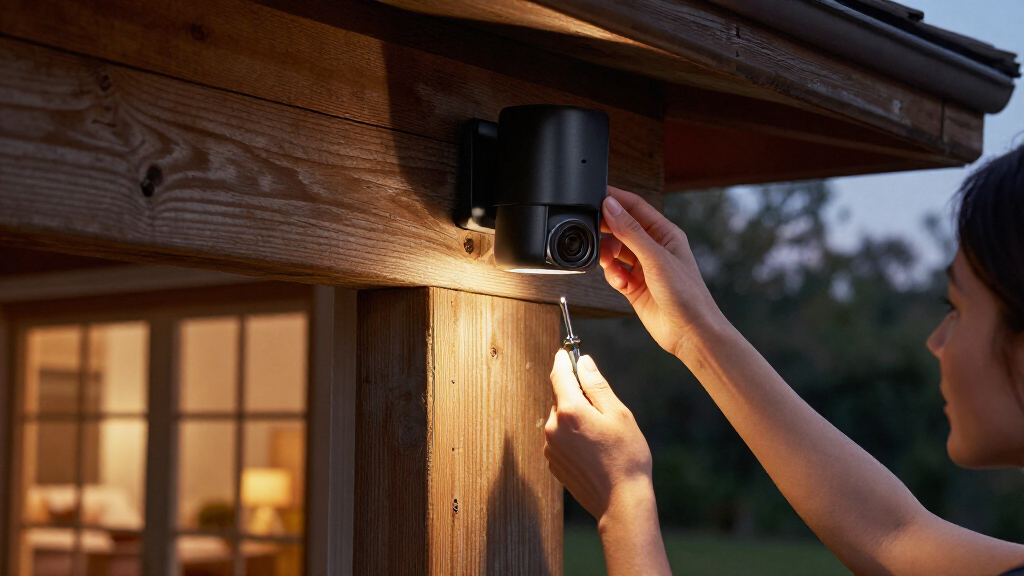
Finally, secure the mount. Use the provided screws and anchors. If you’re mounting on siding or brick, ensure the hardware is appropriate for the material. A loose camera will vibrate in the wind, causing blurry footage. Test the angle during the day and at night. The lighting conditions change dramatically, and you want to ensure the spotlight covers the area you intend to monitor. This iterative testing ensures the system performs under real-world conditions, not just in the showroom.
Frequently Asked Questions
Does a spotlight camera record in color at night?
Yes, most models switch to color mode when the spotlight activates. When the spotlight is off, they typically use infrared LEDs for black-and-white footage. Some advanced cameras can produce color images in low light without turning on the spotlight.Is a spotlight camera better than a floodlight camera?
It depends on your needs. A spotlight provides a narrower, more focused beam, while a floodlight illuminates a broader area. Floodlights are often brighter and more effective for large yards, while spotlights are less intrusive for smaller entrances.Does the camera need Wi-Fi to work?
Yes, smart features like phone alerts and remote viewing require an internet connection. Some cameras can record locally to a microSD card without Wi-Fi, but you won’t receive real-time notifications or be able to view live footage remotely.How long does the battery last on a battery-powered model?
Battery life varies widely based on usage. Frequent spotlight use, cold temperatures, and high motion activity can drain the battery in weeks. Light usage might last several months. Treat advertised estimates as best-case scenarios.Can I use a smart outdoor camera to monitor my neighbor’s property?
No, you should aim the camera to cover only your own property. Recording into neighbors’ private spaces can violate privacy laws and local regulations. Always check local laws regarding surveillance and audio recording before installation.Conclusion
Choosing a smart outdoor camera with spotlight isn’t about finding the most expensive gadget. It’s about matching features to your specific needs. Do you need the deterrence of a floodlight or the discretion of a spotlight? Are you willing to pay for cloud storage, or do you prefer local control? Answer these questions first, then pick the model that fits.
Remember, the best security system is one you actually use. A camera that’s always on, always charged, and always sending relevant alerts is far more valuable than a high-spec device that’s constantly offline or ignored. Secure your home with confidence, and keep your neighbors happy by respecting their privacy.