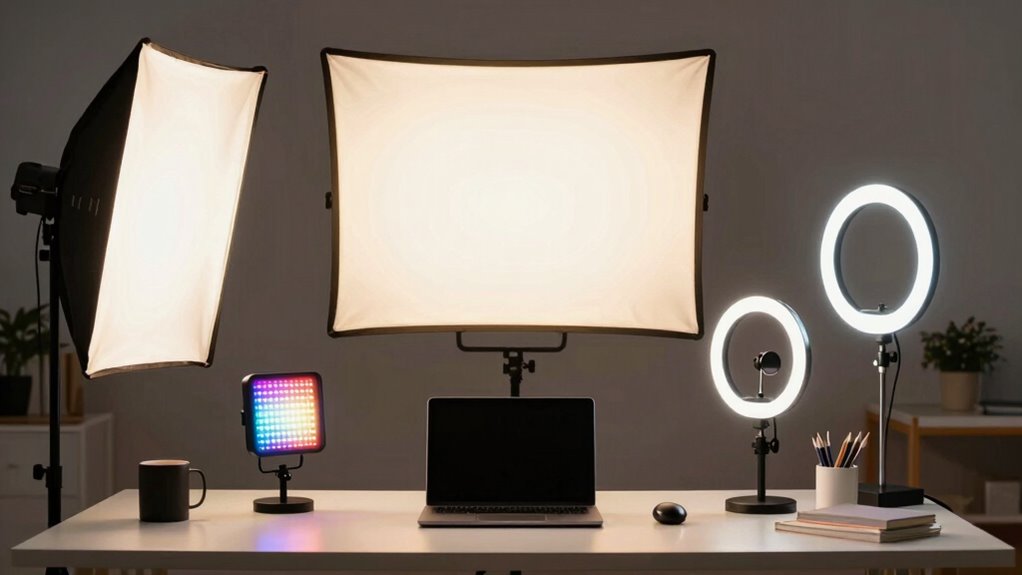
Finding the right video conference lighting kit can dramatically improve your on-camera presence, whether for remote work, streaming, or virtual meetings. The Cyezcor Video Conference Lighting Kit stands out as the best overall choice thanks to its ease of use and balanced features. For those seeking adjustable lighting with multiple modes, the Video Conference Lighting for Zoom with Stand offers exceptional versatility. However, choosing the right kit involves tradeoffs between brightness, color accuracy, ease of setup, and price. Keep reading for a detailed breakdown of the top options and what makes each unique.

Get health and wellness essentials delivered free with Prime
- Fast, free delivery on millions of items
- Prime Video, Amazon Music and more included
- Member-only deals all year
Key Takeaways
- The highest-rated kits combine high CRI ratings with adjustable color and brightness for natural-looking light.
- Clip-on models excel for portability and quick setup, but often lack the power needed for larger spaces.
- Stand-mounted kits generally provide more consistent lighting but tend to be more expensive and bulky.
- Most top picks feature multiple light modes and dimming options, which are key for customizing your lighting environment.
- Price correlates with features like CRI, number of modes, and build quality; premium options tend to offer better color fidelity.
| Cyezcor Video Conference Lighting Kit, Ring Light for Monitor Clip-On |  | Best for Portability and Ease of Use | Color Temperatures: 3200K-6800K | Brightness Levels: 5 | LED Beads: 48 | VIEW ON AMAZON | See Our Full Breakdown |
| Video Conference Lighting for Zoom with Stand, 30 Modes, CRI>98 |  | Best for Studio-Quality, Customizable Lighting | CRI: >98 | Color Temperature: 2700K-6500K | Brightness Levels: 10 | VIEW ON AMAZON | See Our Full Breakdown |
| Lume Cube Video Conference Lighting Kit for Live Streaming and Video Calls |  | Best for Flexible, Customizable Desktop Lighting | Brightness: 1-100% | Color Temperature: Warm to Cool | Mount Type: Suction cup | VIEW ON AMAZON | See Our Full Breakdown |
| Neewer Basic 5-inch Ring Light for Video Conference and Content Creation, Clip-On with Desk Tripod Stand |  | Best for Compact, Desktop Use | LED Count: 60 LEDs | Color Temperature: 3000K-6000K | CRI: >97 | VIEW ON AMAZON | See Our Full Breakdown |
| Zoom Lighting for Computer, Adjustable Desk Ring Light with Stand, 30 Light Modes, CRI 97.8 |  | Best for Space-Saving, Adjustable Positioning | Light Modes: 30 | Color Temperature: 3000K-6500K | Brightness Levels: 10 | VIEW ON AMAZON | See Our Full Breakdown |
| HumanCentric Video Conference Lighting – Webcam Light for Streaming LED Double Kit | 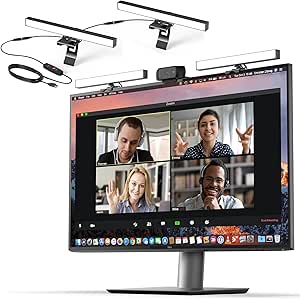 | Best Overall for Versatile, Expandable Lighting | Number of Lights: 2 (expandable up to 4) | Power Source: USB-C or USB-A port (adapter not included) | Maximum Distance Between Lights: 30 inches | VIEW ON AMAZON | See Our Full Breakdown |
| yAyusi Dual-Lamp Video Conference Lighting with Remote and Touch Control |  | Best for Feature-Rich Control and Flexibility | Number of Light Bars: 2 | Control Modes: Touch and remote control | Color Modes: 3 | VIEW ON AMAZON | See Our Full Breakdown |
| Video Conference Lighting Kit with Ring Light, Clip-on & Tripod, Dimmable Color & Brightness for Webcam, Zoom, Streaming |  | Best for Versatility and Easy Mounting | Color Temperature: 3200K to 6500K | Brightness Levels: 5 | Lamp Beads: 64 x 10W | VIEW ON AMAZON | See Our Full Breakdown |
| video conference lighting kit | Brightness Levels | Color Temperature |
|---|---|---|
| Cyezcor Video Conference Light | 5 | — |
| Video Conference Lighting for | 10 | 2700K-6500K |
| Lume Cube Video Conference Lig | — | Warm to Cool |
| Neewer Basic 5-inch Ring Light | 10 | 3000K-6000K |
| Zoom Lighting for Computer | 10 | 3000K-6500K |
| HumanCentric Video Conference | — | — |
| yAyusi Dual-Lamp Video Confere | 10 | — |
| Video Conference Lighting Kit | 5 | 3200K to 6500K |
More Details on Our Top Picks
Cyezcor Video Conference Lighting Kit, Ring Light for Monitor Clip-On
The Cyezcor clip-on ring light stands out for its simple, quick setup, making it ideal for users who need flexible, on-the-fly lighting adjustments. Compared with larger, more complex options like the Video Conference Lighting with Stand, this model sacrifices some versatility in positioning but excels in portability and ease of attachment to a monitor. Its adjustable color temperature and brightness allow for tailored lighting, reducing glare and shadows during calls. However, the clip size limits compatibility to small monitor edges, and the lack of a battery option means it’s best used near USB outlets. This makes it perfect for remote workers or students who want a straightforward solution without bulk.
Pros:- Adjustable color temperature and brightness for versatile lighting
- Even, soft light reduces glare and shadows
- Easy clip-on design compatible with monitors
- USB powered for convenient use
Cons:- Limited to small monitor edges due to clip size
- No battery operation for portable use
Best for: Remote workers or students needing a compact, easy-to-attach lighting solution
Not ideal for: Content creators or professionals requiring extensive, adjustable studio lighting setups
- Color Temperatures:3200K-6800K
- Brightness Levels:5
- LED Beads:48
- Power:USB powered
- Size:Lightweight and portable
Our verdict“Ideal for users seeking a lightweight, portable light that attaches easily to their monitor for casual or semi-professional settings.”
Video Conference Lighting for Zoom with Stand, 30 Modes, CRI>98
This professional-grade lighting offers a high CRI>98, delivering accurate colors that reduce eye strain and improve visual clarity during video calls. Unlike the Neewer Clip-On Ring Light, its larger size and adjustable stand provide more flexible positioning in a dedicated workspace. The 30 lighting modes with memory function cater to various moods and environments, making it suitable for users who want consistent, high-quality lighting. The larger footprint and need for a stable surface may be less ideal for small desks or portable setups. This choice makes the most sense for remote professionals or streamers who prioritize color accuracy and adjustable settings.
Pros:- High CRI>98 for accurate, vibrant colors
- 30 customizable lighting modes with memory
- Flexible, adjustable stand with 360° rotation
- Stable anti-scratch base with non-slip pads
Cons:- Higher price point compared to basic ring lights
- Requires USB power, limiting mobility
- Larger size may take up desk space
Best for: Remote workers or content creators needing studio-quality lighting with precise control
Not ideal for: Casual users or those with limited space looking for a compact solution
- CRI:>98
- Color Temperature:2700K-6500K
- Brightness Levels:10
- Lighting Modes:30
- Stand Height Range:20.5 to 28.5 inches
- Light Head Size:7×7 inches
Our verdict“Best suited for professionals who want precise, customizable lighting for high-quality video conferences or streaming.”
Lume Cube Video Conference Lighting Kit for Live Streaming and Video Calls
The Lume Cube kit offers adjustable brightness and color temperature, making it highly adaptable for different environments and skin tones. Its built-in diffuser softens light for a natural appearance, and the flexible mount allows for easy positioning. When compared to the Neewer Ring Light, it provides more precise control over lighting parameters, though it requires additional setup and may need a dedicated space for optimal placement. Battery life is extended via USB, but continuous use may depend on having power outlets nearby. This product suits remote workers or streamers who value versatility in their lighting setup.
Pros:- Adjustable brightness and color temperature
- Easy to attach with suction cup mount
- Long-lasting USB-powered battery option
- Built-in diffuser for softer light
Cons:- Limited to USB power for extended use without battery
- May need additional setup for optimal positioning
Best for: Remote professionals or streamers seeking customizable lighting with easy attachment options
Not ideal for: Users seeking a plug-and-play, all-in-one solution without extra setup
- Brightness:1-100%
- Color Temperature:Warm to Cool
- Mount Type:Suction cup
- Battery Life:Extended, USB powered
Our verdict“A versatile lighting kit perfect for users needing adjustable, portable light for calls and broadcasts.”
Neewer Basic 5-inch Ring Light for Video Conference and Content Creation, Clip-On with Desk Tripod Stand
The Neewer BR60 offers a compact, portable design with 60 LEDs, making it suitable for tight desktop setups. Its adjustable brightness and multiple modes provide decent flexibility, but it lacks the high color accuracy of premium models like the Zoom CRI>97.8. The included mini tripod allows for flexible positioning, yet the clip-on design limits use to monitors and desktops, not smartphones or portable devices. This makes it less ideal for mobile content creators but excellent for users who need a lightweight, USB-powered light for regular computer use. This is a practical choice for remote workers or small-scale streamers with limited space.
Pros:- Compact and portable for desktop setups
- Multiple lighting modes and adjustable brightness
- USB powered with flexible tilt and pan
- Includes mini tripod for stable placement
Cons:- Not suitable for smartphone mounting
- Limited illumination strength for professional studio use
Best for: Remote workers or content creators who need a portable, desktop-focused lighting solution
Not ideal for: Professional videographers or streamers requiring high-CRI, studio-grade lighting
- LED Count:60 LEDs
- Color Temperature:3000K-6000K
- CRI:>97
- Brightness Levels:10
- Power:10W
- Tripod Height:9cm
Our verdict“A convenient, space-efficient light ideal for casual video conferencing and content creation on a desktop.”
Zoom Lighting for Computer, Adjustable Desk Ring Light with Stand, 30 Light Modes, CRI 97.8
This desk ring light combines adjustable height and 360° rotation, making it highly adaptable for personal workspaces. Its high CRI of 97.8 ensures vibrant, true-to-life colors, surpassing many standard ring lights like the Neewer Clip-On. The included stand allows for more precise positioning, but the need for a USB power source could limit placement options, especially in areas without accessible outlets. Setup might be more involved than clip-on options, but it offers superior stability and flexibility. This pick is ideal for users who want a customizable, space-efficient light with a dedicated stand.
Pros:- Adjustable height and 360° rotation for customized positioning
- High CRI of 97.8 for vibrant colors
- Sturdy metal base with non-slip pads
- 30 adjustable light modes
Cons:- Requires USB power, limiting placement options
- Setup may be more complex than clip-on alternatives
Best for: Remote workers or content creators needing adjustable, space-efficient lighting with a stable base
Not ideal for: Individuals seeking a simple, plug-and-play clip-on light for quick setup
- Light Modes:30
- Color Temperature:3000K-6500K
- Brightness Levels:10
- CRI:97.8
- Power:10W
- Height Range:22 to 32.5 inches
Our verdict“Best suited for those who want a high-CRI, adjustable desk ring light with a stable stand for versatile placement.”
HumanCentric Video Conference Lighting – Webcam Light for Streaming LED Double Kit
This double light kit stands out for its ability to deliver soft, natural-looking illumination that enhances your video appearance without overpowering. Compared with the Video Conference Lighting Kit with Ring Light, it offers better color temperature adjustment and expandability, making it more adaptable to different environments. One key advantage is its ease of setup—simply clip onto your monitor or laptop, and you’re ready to go, although you’ll need to purchase a power adapter separately. The ability to expand up to four lights provides flexibility for more detailed lighting setups, but the maximum of two lights with USB-A power can limit brightness for some users. This option is ideal for professionals seeking a customizable and expandable lighting solution but might be less suitable for those who prefer all-in-one kits with included adapters.
Pros:- Provides soft, natural-looking light that enhances appearance
- Adjustable brightness and color temperature for personalization
- Easy to install and remove without damaging screens
- Expandable up to four lights for flexible setups
Cons:- Power adapter not included, requiring extra purchase
- Limited to stationary use on monitor or laptop
- Maximum of two lights recommended with USB-A power limits brightness
Best for: Professionals and streamers who want an adaptable, expandable lighting solution that improves video quality over standard clip-on options.
Not ideal for: Users seeking a fully integrated kit with all accessories included, or those with limited desk space, as expansion requires additional hardware.
- Number of Lights:2 (expandable up to 4)
- Power Source:USB-C or USB-A port (adapter not included)
- Maximum Distance Between Lights:30 inches
- Includes:Cable clips, Velcro straps, USB-C to USB-A adapter
- Diffuser:Preinstalled for soft light
Our verdict“This kit is best suited for users wanting a customizable, expandable lighting setup that elevates video quality without complex installation.”
yAyusi Dual-Lamp Video Conference Lighting with Remote and Touch Control
This dual-lamp LED ring light offers impressive control options, including touch and remote adjustments, making it a standout for users who want precise lighting customization. Unlike the Video Conference Lighting Kit with Ring Light, which provides basic brightness and color adjustments, this model’s 10 brightness levels and three color modes give more granular control. Its rotatable design adds versatility, allowing you to position the lights exactly where needed. However, setup involves connecting to a separate power source and may take a few minutes, plus its size limits its compatibility to devices within specific dimensions. While the remote control offers convenience, some users may find its interface less intuitive than simple manual controls. Overall, this kit is best for content creators who prioritize control and flexibility but aren’t bothered by a slightly more involved setup process.
Pros:- Provides bright, even lighting suitable for professional calls and recordings
- Adjustable brightness and color modes for customization
- Rotatable design for flexible positioning
- Includes remote control for easy adjustments
Cons:- Requires a separate power source and setup time
- Limited to devices within specific size ranges
- Remote control interface may be complex for some users
Best for: Content creators and professionals who want detailed control over lighting adjustments for varied video environments.
Not ideal for: Users seeking a plug-and-play solution with minimal setup, or those with devices outside the specified size range, as compatibility is limited.
- Number of Light Bars:2
- Control Modes:Touch and remote control
- Color Modes:3
- Brightness Levels:10
- Rotation:360° horizontal, 180° vertical
- Device Compatibility:5.5-8.3 inches height, 1.55-2.35 inches width
Our verdict“Ideal for users who need precise, customizable lighting controls and are comfortable with a slightly more involved setup process.”
Video Conference Lighting Kit with Ring Light, Clip-on & Tripod, Dimmable Color & Brightness for Webcam, Zoom, Streaming
This kit offers a practical balance of adjustable color temperature, brightness, and flexible mounting options, making it suitable for a variety of setups. Compared to the HumanCentric Webcam Light, which excels in simplicity, this ring light provides more control over lighting tone and intensity, thanks to its dimmable features. Its clamp and tripod give users multiple placement options—clamp it on a monitor or set it up on a desk—adding to its versatility. However, since it’s USB-powered, it may not be suited for extended use in very bright environments without external power sources, and its brightness levels might seem limited in darker or very bright settings. This product makes the most sense for users who need adjustable lighting in different environments and prefer a straightforward, flexible mounting solution.
Pros:- Adjustable color temperature and brightness for various needs
- Soft, ring light design minimizes shadows and enhances appearance
- Flexible mounting options with clamp and tripod
- USB powered for convenient use with multiple devices
Cons:- Limited brightness in very bright or very dark environments
- Requires external power for extended use
- Brightness levels may not suffice for all lighting conditions
Best for: Users who want a versatile, easy-to-mount lighting option with adjustable settings for varied lighting conditions during video calls or streaming.
Not ideal for: Those requiring very high brightness levels or longer usage without external power, or users who prefer a fully integrated all-in-one solution with built-in stand.
- Color Temperature:3200K to 6500K
- Brightness Levels:5
- Lamp Beads:64 x 10W
- Power Source:USB
- Included Accessories:Clamp, flexible tripod, manual
Our verdict“Best suited for users seeking flexible, adjustable lighting with simple mounting options for diverse video environments.”

How We Picked
This selection process focused on evaluating each lighting kit’s performance, usability, build quality, and value. We prioritized products with high color rendering index (CRI) ratings for natural skin tones, adjustable brightness and color temperature, and user-friendly controls. Ease of setup and portability also influenced rankings, as many users need quick, reliable lighting solutions. Cost was considered in relation to features offered, ensuring a balanced range from budget-friendly options to premium kits. Ultimately, these products were ranked based on how well they enhance video quality while remaining practical for everyday use.Factors to Consider When Choosing Video Conference Lighting Kit
Choosing a video conference lighting kit involves understanding several key factors that influence your video quality and ease of use. The right kit should complement your space, match your budget, and meet your specific needs—whether for professional work, streaming, or casual video calls. Here are the main considerations to keep in mind beyond just the product features.Lighting Quality and Color Accuracy
The primary goal of a lighting kit is to produce flattering, natural-looking light. Look for a high CRI (Color Rendering Index) rating, ideally above 95, which ensures accurate skin tones and color reproduction. Lower CRI lights may cast unflattering hues or distort colors, especially in professional settings. Consider if the kit offers adjustable color temperature to match your environment, which helps prevent washed-out or overly warm tones. Investing in higher-quality lighting can significantly improve your appearance on camera and make your video calls more professional.
Adjustability and Control Options
Versatility in brightness and color temperature control is vital. Many kits feature dimming capabilities and multiple light modes—some with remote or app controls. This flexibility allows you to adapt to different lighting conditions, from bright daylight to dim evening settings. Be cautious of models with only fixed brightness, which can limit your ability to customize your lighting. Also, check if controls are intuitive; complicated setups can frustrate users who need quick adjustments before calls.
Ease of Setup and Portability
Depending on your space and mobility needs, consider how quickly and easily the kit can be assembled. Clip-on models are generally portable and ideal for quick setup, especially if you work from multiple locations. Stand-mounted kits often require more space and setup time but offer more consistent lighting. Look for lightweight, durable materials and clear instructions. If you frequently change locations or need to travel with your lighting, prioritize compact, travel-friendly designs.
Power Source and Durability
Check whether the kit is powered via USB, batteries, or AC adapters. USB-powered lights can connect directly to your computer or portable power banks, offering convenience for mobile setups. Battery-powered options provide flexibility but may require regular recharging or replacement. Durability matters, especially if you plan to move the kit frequently. Well-built, sturdy components reduce the risk of damage over time and ensure consistent performance during important calls.
Price and Value
While premium kits often deliver better color accuracy, more modes, and robust build quality, they come at higher costs. Budget options can be effective for casual use but may compromise on light quality or adjustability. Consider your specific needs—professional streaming or remote work may justify a higher investment in a premium kit, while occasional video calls might be fine with a more affordable model. Balance features against your budget to find the best value for your intended use.
Frequently Asked Questions
Can I use a regular desk lamp for video conferencing?
While a regular desk lamp can provide some extra light, it often lacks the adjustable color temperature, high CRI, and brightness control needed for professional-looking video. Desk lamps may cast uneven light or create harsh shadows, which can be unflattering or distracting. A dedicated video conference lighting kit is designed to produce soft, even illumination that enhances your appearance without harsh glare. For the best results, investing in a purpose-built kit makes a noticeable difference.
Is a ring light better than a rectangular panel for video calls?
Ring lights are popular for their ability to produce uniform, flattering light with minimal shadows, especially around the face. They tend to be more compact and easier to position, making them ideal for small spaces or quick setups. Rectangular panels or softboxes can offer broader light coverage and may be better suited for larger areas or multi-person setups. The choice depends on your space, style preference, and whether you prioritize simplicity or broader illumination.
How important is color temperature adjustment in a video conference kit?
Adjusting color temperature allows you to match your lighting to ambient conditions, producing a more natural look. It also helps prevent your skin tones from appearing washed out or overly warm. If your environment varies frequently, a kit with adjustable temperature controls offers the flexibility to maintain consistent, professional-quality lighting. Without this feature, you might have to compromise on the look of your video or rely on external lighting sources.
Do I need a professional lighting setup for everyday video calls?
Most casual users can achieve decent results with simple, affordable kits that provide adjustable brightness and basic color control. However, if you regularly participate in professional meetings, streaming, or content creation, investing in a higher-quality, feature-rich kit can significantly improve your appearance. Better lighting reduces shadows, enhances clarity, and creates a more polished image, making it worth considering for frequent or important calls.
What should I prioritize if I have limited space?
In small or cluttered environments, compact, clip-on, or ring lights that attach directly to your monitor or webcam are ideal. These options save space and are quick to set up, reducing the need for additional desk area. However, ensure they provide enough brightness and color quality for your needs. If you have a bit more room, a small stand-mounted kit with adjustable height might offer better lighting control without taking up too much space.
Conclusion
For users seeking the best overall experience, the Cyezcor Video Conference Lighting Kit offers a balanced mix of features and ease of use. Those on a budget will find the Neewer Basic 5-inch Ring Light to deliver decent quality at a lower price. Professionals or streamers who demand premium color fidelity and multiple modes should consider the Video Conference Lighting for Zoom with Stand. Beginners or casual users benefit from simple, clip-on options that require minimal setup. Ultimately, selecting the right kit depends on your space, budget, and how much you want to improve your video quality—these picks cover all those needs effectively.
Fall Picks
fall essentials
As an affiliate, we earn on qualifying purchases.